Garlic.js: How to Easily Save Form Input to Local Storage
This time, we will introduce how to save form input to local storage using Garlic.js.
By using this feature, users can keep their input even if the page is reloaded (refresh with “F5” or navigating to another page and returning), without losing entered data.
What is Garlic.js?
Garlic.js is a useful library that automatically saves form input and restores it when the user opens the form again. This enhances the user experience by preventing data loss even if the user accidentally closes the page or loses their internet connection.
CSS Description
First, let’s set the style of the input form. Use the CSS below to apply basic styling. Modify it as needed.
<style>
body {
  font-size: 18px;
  text-align: center;
  line-height: 1.6em;
}
h1{
  text-align: center;
  font-size: 20px;
  line-height: 1.6em;
  padding: 20px 0 0 0;
}
p{
  padding-bottom: 20px;
}
.fb{
  font-weight: bold;
}
</style>
HTML Description
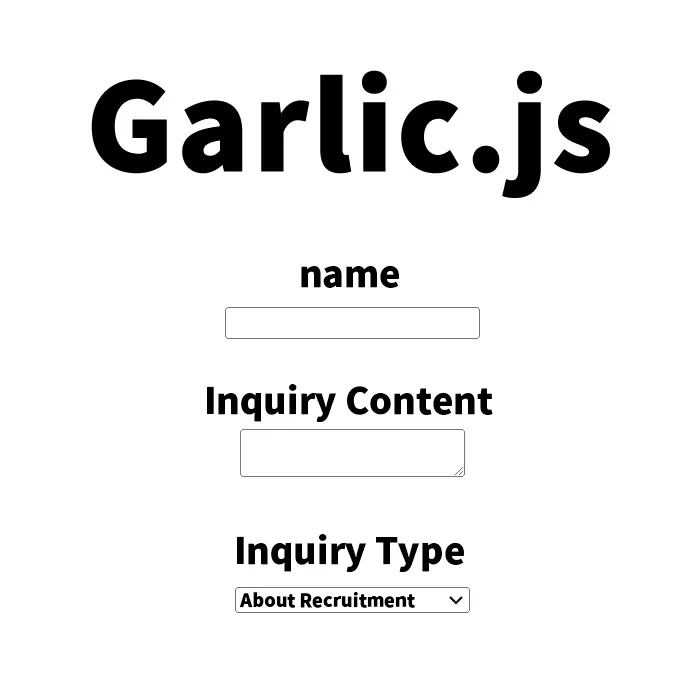
Next, we will write HTML that saves form input to local storage using Garlic.js. Simply add the attribute data-persist=”garlic” to the form tag, and Garlic.js will automatically save the form input.
<h1>Save form input to local storage using Garlic.js.</h1>
<p>Even if you re-display the page (refresh with "F5"), the input content will be retained.<br>Clicking the "Submit" or "Reset" buttons will reset the input content.</p>
<form data-persist="garlic" method="POST">
<label for="field1" class="fb">Name</label><br/>
<input type="text" name="mytext" id="field1"/>
<br/><br/>
<label for="field1" class="fb">Inquiry Details</label><br/>
<textarea name="textarea"></textarea>
<br/><br/>
<label for="select" class="fb">Type of Inquiry</label><br/>
<select id="select">
<option value="Regarding Recruitment">Regarding Recruitment</option>
<option value="Work Request">Work Request</option>
<option value="Other Inquiries">Other Inquiries</option>
</select>
<br/><br/>
<label for="select" class="fb">Blood Type</label><br/>
<label class="radio">
A <input type="radio" name="radio1" value="a" />
</label><br/>
<label class="radio">
B <input type="radio" name="radio1" value="b" />
</label><br/>
<label class="radio">
AB <input type="radio" name="radio1" value="ab" />
</label><br/>
<label class="radio">
O <input type="radio" name="radio1" value="o" />
</label>
<br/><br/>
<label for="select" class="fb">Industry</label><br/>
<label class="checkbox">
Construction <input type="checkbox" name="checkbox[]" value="Construction">
</label><br/>
<label class="checkbox">
Manufacturing <input type="checkbox" name="checkbox[]" value="Manufacturing">
</label><br/>
<label class="checkbox">
Information and Communications <input type="checkbox" name="checkbox[]" value="Information and Communications">
</label><br/>
<label class="checkbox">
Transportation / Postal Services <input type="checkbox" name="checkbox[]" value="Transportation / Postal Services">
</label>
<br/><br/>
<input type="submit" class="btn"/>
<input type="reset" class="btn"/>
</form>
JavaScript Description
To use Garlic.js, you first need to load jquery-1.8.2.min.js and garlic.js. Please add the following script tags to your HTML.
<script src="jquery-1.8.2.min.js"></script>
<script src="garlic.js"></script>
Since Garlic.js works in conjunction with jQuery, it is important to load jQuery first. This allows Garlic.js to automatically save and restore form input.
Demo Page: Saving Form Input to Local Storage with Garlic.js
You can check the demo page using Garlic.js from the link below. On this demo page, you can see how form input is actually saved in local storage.
Demo page for saving form input to local storage using Garlic.js
Source: Garlic.js
Detailed information and documentation on Garlic.js can be found from the link below. Use Garlic.js to create more convenient and user-friendly forms.
Summary
Garlic.js is a convenient library that automatically saves form input to local storage and retains it even after the page is reloaded. This improves user experience and reduces the risk of losing input data. Since it can be used with simple settings, consider implementing it in your project.
※If you reuse this content, please do so at your own risk.
Please do not reuse the Google Analytics tag inside the demo page’s head tag.