WordPress Themes Will Not Be Applied as a Site Appearance Without an index.php File

This article explains that a WordPress theme will not be properly applied as the site’s appearance unless it contains an index.php file.
WordPress themes require specific template files, and among them, the index.php file is extremely important.
The index.php file is the most basic template file in a WordPress theme and is used to display the site’s homepage and general pages.
If the index.php file does not exist, WordPress will look for alternative template files, but normally this file serves as the default template.
If the index.php file does not exist in the theme folder, the following issues may occur.
The Theme Is Not Recognized by WordPress
WordPress does not recognize a theme that lacks an index.php file, so it will not be applied to the site as a valid theme.
As a result, the default theme may be displayed or an error message may appear.
Error Message Displayed on the Theme Screen
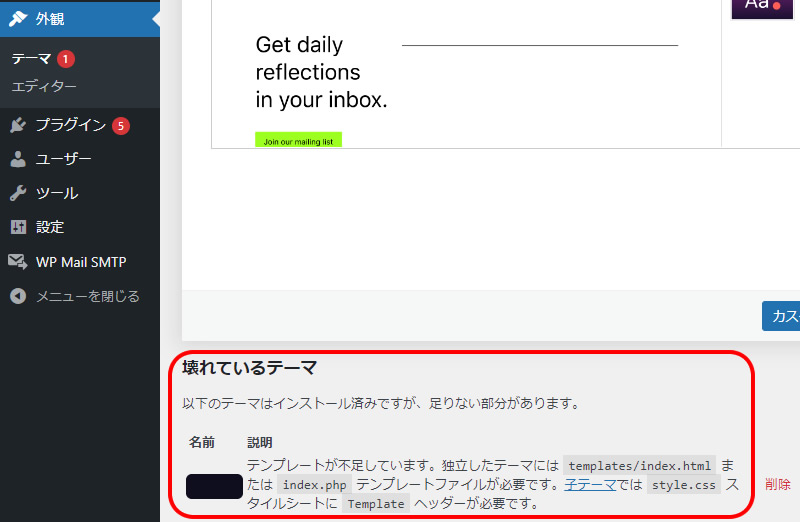
If the index.php file is missing, the following error message will be displayed at the bottom of the WordPress admin screen under “Appearance” → “Themes”.
Broken Theme
The following themes are installed but incomplete.
Templates are missing. Standalone themes require a templates/index.html or index.php template file. Child themes require a Template header in the style.css stylesheet.
Theme Screen Error Message Image
The error message will be displayed in the red-framed area shown below.
The Theme Does Not Function Correctly
Without an index.php file, the theme is very likely to malfunction.
Issues such as pages not displaying, broken styles, or error messages may occur.
How to Fix the Issue
Create and upload an index.php file.
If a home.php file exists, copy that file, rename it to index.php, and upload it.
If there is no file to duplicate, create an index.php file like the example below.
Example of Basic index.php File Content
To properly create a theme, you need to create an index.php file inside the theme folder.
Below is an example of basic index.php file content.
<?php
get_header(); // Retrieve the header
while (have_posts()) : the_post();
  // Display the page content
  the_content();
endwhile;
get_footer(); // Retrieve the footer
?>
This index.php file has a basic structure for displaying the theme’s main content area.
get_header() and get_footer() are WordPress functions used to retrieve the header and footer.
After creating the index.php file, you should be able to activate the new theme from the WordPress dashboard and apply it as the site’s appearance theme.
However, before changing themes, it is recommended to back up your current theme.
*If you reuse this content, please do so at your own responsibility.
Do not reuse the Google Analytics tag included in the demo page’s head tag.*